
Description
Microsoft Visio 2021 Professional
Microsoft Visio 2021 Professional software is ideal for the simple creation of individual diagrams in a professional environment. The software solution is a consistent further development of the Microsoft Visio 2019 Professional version and has been available to users since October 2021.
Create impressive charts with a variety of tools
The capabilities of the Microsoft Visio 2021 Professional software primarily relate to the individual creation of high-quality and meaningful diagrams. With the help of numerous templates, Microsoft makes sure that getting started is easy. The templates are not only available in thousands of versions, but are also geared towards the needs of the users and are based on the experience of professional users. In many cases, the templates can still be adapted in the essential points in order to meet individual tastes and requirements. With the help of the templates, the user then creates diagrams of various types for the desktop or the web. The choice of options is very broad, especially in the current generation of software. Flow charts, organization charts or even floor plans leave almost nothing to be desired.
The technical possibilities for the individual design of your own diagrams go well beyond the classic templates. Microsoft Visio supports drawing with a pen or with a finger, for example, if a corresponding touch-enabled device is used. In order to provide the new diagrams with the required information, Microsoft Visio 2021 comes with several interfaces ex works. For example, import data sets from Excel or Access to integrate the relevant facts into your diagram.
One of the great strengths of the Microsoft Visio 2021 software is its very good accessibility. Thanks to this, you as a user benefit from improved speech output, a revised keyboard and the use of the software with several users at the same time. As the main user, however, you retain control even when working with colleagues; for example, you will receive a direct notification at any time of changes made. You also decide for yourself when and how the changes made by your colleagues should be adopted. The developer brings data security and collaboration with colleagues together in a successful combination.
Keep up to date with Visio 2021
The year 2021 brings some changes for the users of modern software. The developer not only brings the Microsoft Office applications up to date, but also publishes the new Windows 11 operating system and revises the individual applications that work closely with the Office suite. This also applies to the previously used Microsoft Visio 2019 Professional. However, the differences compared to Microsoft Visio 2019 Professional are rather manageable, among other things the developer is working on the design. The optics should adapt to the new Windows 11 and therefore convince with muted colors and rounded corners and edges. With the new dark mode, the developer is also introducing a feature compared to Microsoft Visio 2019 Professional, which should provide a better overview.
Combine the functionality with other software
However, with the older version Microsoft Visio 2019 Professional and the current version, you can only exploit the full capabilities and strengths in cooperation with other individual applications. The Microsoft Office applications in particular are considered a good choice. This is also due to the interfaces used. Visio is designed so that you can import various data sets directly for your diagrams. This applies, for example, to the Excel or Access programs. Transfer your databases or your spreadsheet directly into the Visio program in order to prepare them optically in the form of a diagram. The use of the other Office functions, for example PowerPoint or Word, harmonises perfectly with Visio and ensures significantly more productivity in everyday life. The same goes for teams. With the functionality of the program, you always stay in contact with your colleagues and can deal with upcoming projects in collaboration.
What’s new in Visio Professional 2021?
Note: All features listed here, unless otherwise noted, are also included in Visio LTSC Professional 2021 for commercial customers.
New Azure stencils and shapes
We’ve added many more stencils to help you create up-to-date Azure diagrams. You can use these new stencils to build Azure diagrams for network topologies, virtual machine configurations, operations, and more.

New AWS stencils and shapes
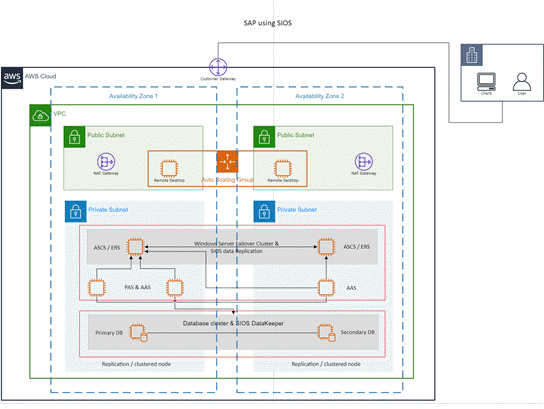
We have enabled infrastructure shapes from another major cloud provider: Amazon Web Services (AWS). You can now use stencils with the latest AWS shapes to help you create diagrams.
Ready-made graphics for your diagrams
We’re constantly adding more rich media content to the Office Premium Creative Content collection, a curated library of stock images, icons, and more that you can add to your Visio drawings.
Content for social distancing planning in the workplace
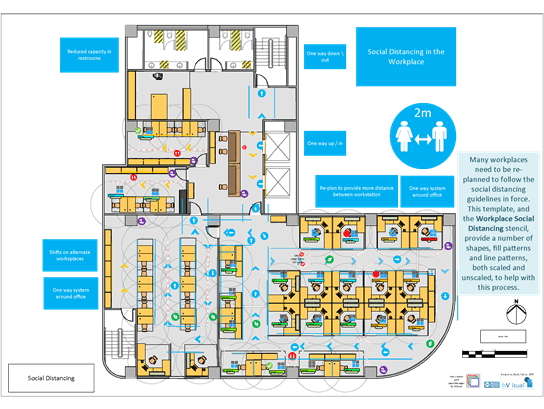
Many workplaces need to be re-planned to follow the social distancing guidelines in force. This template, and the Workplace Social Distancing stencil, provide a number of shapes, fill patterns and line patterns, both scaled and unscaled, to help with this process.
Create wireframe diagrams for mobile apps
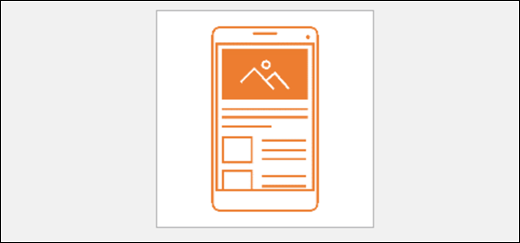
Bring ideas to life by using a Visio wireframe. A wireframe is a detailed visual model of an interface that is like a blueprint of functionality and content. These new mobile app templates are ideal for creating a low-fidelity, design sketch to present ideas, arriving at a team consensus, and forming the basis of a high-fidelity wireframe.
Visual refresh
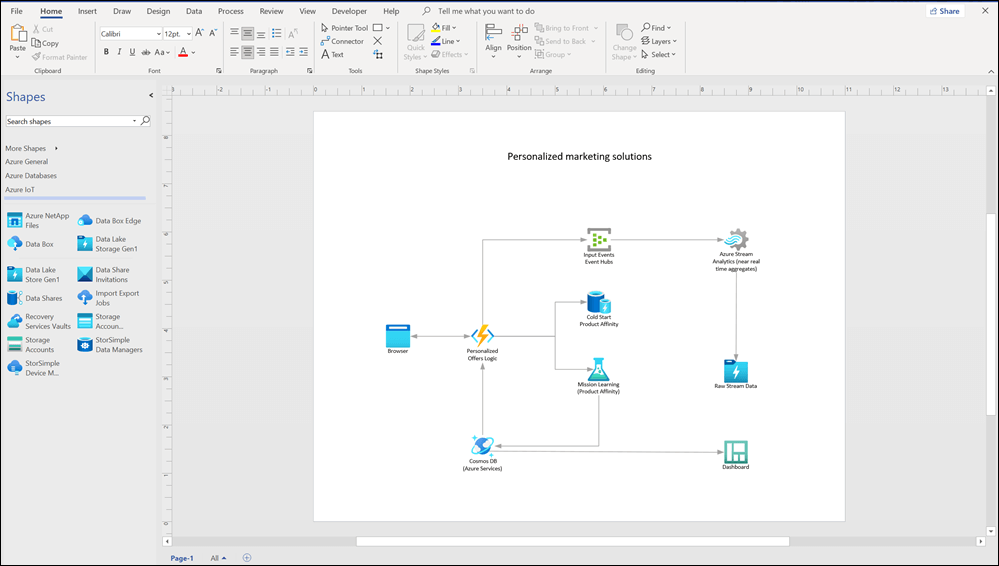
Work with a modernized Start experience and newly refreshed tabs in the ribbon.
Experience a clean, clear style with monoline iconography that communicates action and features with simple visuals in Visio.
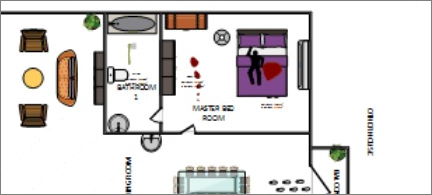
Content for recreating and redesigning crime scene investigations
Use new Evidence, Indoor, and Outdoor stencils in the Crime Scene Investigation template to recreate crime scenes in detail. Find the template under Maps and Floorplans.
Pick the perfect color
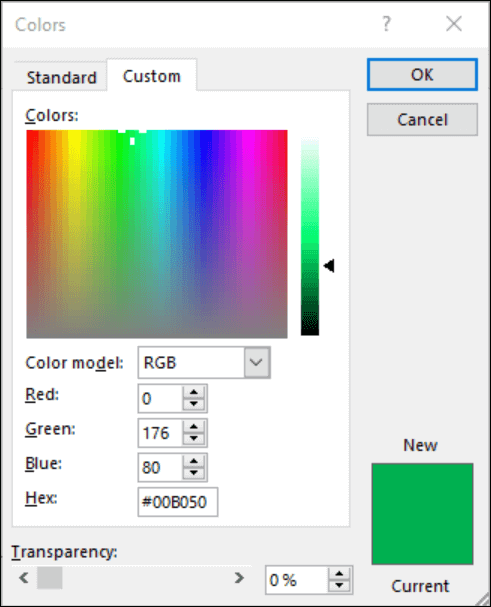
Based on your feedback, we’ve added a new input field in the Colors dialog for Hex color values. Never again will you spend time converting Hex color values into RGB values.
For any property where you can define a color, you can now enter a Hex color value in the Hex box, for example, #0F4C81 or 444.
Improved UML and ERD stencils
We’ve continued to make visual and functional improvements to our UML and ERD stencils in this release.
General performance and stability fixes
We continue to listen to your suggestions and feedback and we’ve worked on improving performance in Visio and fixing issues that you’ve identified.
Have a comment or suggestion about Microsoft Office? We need your feedback to help us deliver great products. In Visio, you can suggest new features, tell us what you like or what’s not working by clicking File > Feedback.
What are the system requirements?
These are the minimum system requirements for installing the Microsoft Visio 2021 Professional software on a PC. If your device does not meet these requirements, you may not be able to install it.
Operating System – Windows 10/11, Windows Server 2019/2021, Apple is not supported
Processor – 1 gigahertz (GHz) or faster
RAM – 2 GB
Storage – 3 GB
Graphics card – DirectX 10 or higher
Display – 1280 x 800 or higher
Other – Internet connection, Microsoft Account (it’s free)
Safe, official Microsoft download link.
The product license key and setup information will be sent via eMail within 24 hours, usually much sooner.